How we modernized a nonprofit website and increased donations by 38%. Mobile-first donation flow, 0.9s load time, storytelling that converts supporters.
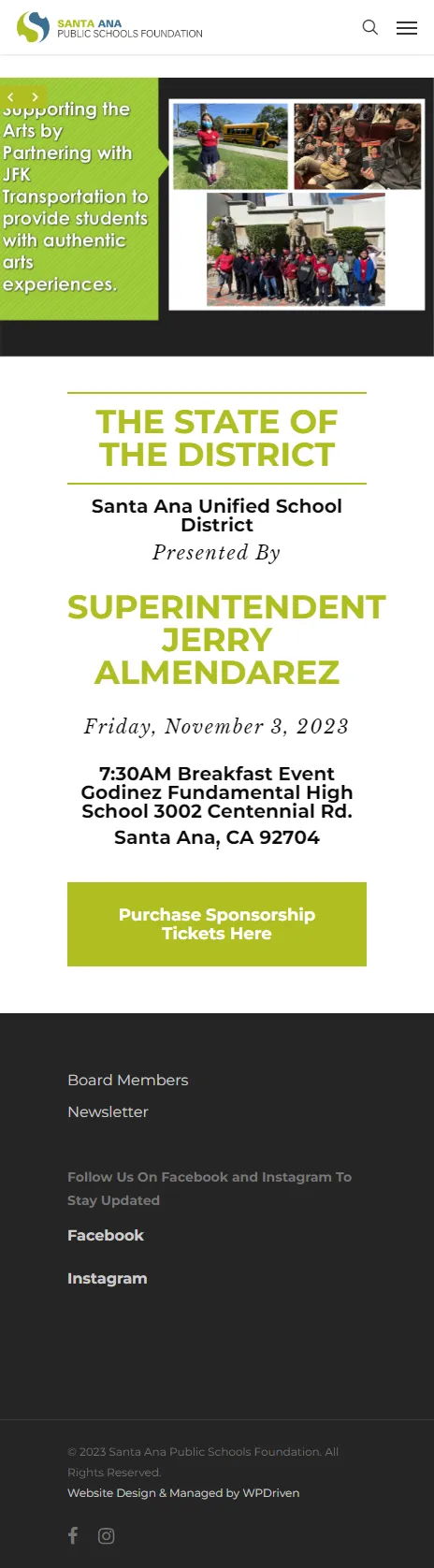
Quick Answer: Santa Ana Public Schools Foundation is a nonprofit that was growing, but their website was not. We modernized the site with clearer storytelling, easier donation flows, and a mobile-first design that lets donors give in under a minute. The site loads in 0.9 seconds, and donations increased by 38%. This case study breaks down the problem, what we built, and why it works for nonprofits.
For a nonprofit, a website has two jobs. It has to tell the story clearly enough that a visitor cares, and it has to make giving easy enough that they act on it. Most nonprofit websites do one of those well and the other badly.
Santa Ana Public Schools Foundation’s site told the story, but it did not make giving easy. Donors who wanted to support the mission had to work to figure out how. That is a conversion problem, and it was costing the foundation donations every month.
We modernized the site in a way that fixed both. Here is what changed, and why donations increased by 38%.
If you want the full breakdown of what a nonprofit build like this costs, see our WordPress web design pricing.
The problem
Three issues stood out before we touched a single line of code.
The donation flow was too slow. The old site had a donation page, but the flow to get there was not obvious. A donor who was ready to give had to find the donate button, navigate to a form, fill out multiple fields, and hope the payment worked. Every extra step loses donors. That is a well-documented pattern in nonprofit conversion data, and it was showing up in the foundation’s numbers.
The story was not doing its job. A nonprofit’s website is a storytelling tool. Donors give because they believe in the mission. The old site told the story, but it was buried behind text-heavy pages and a layout that did not pull the visitor in. A visitor who does not feel the mission in 10 seconds will not scroll to find it.
The site was slow on mobile. Most donors browse on their phones. The old site was built for desktop first, and the mobile experience was an afterthought. A slow or clunky mobile experience loses the donor who was ready to give right there.
The result was a nonprofit with a website that looked like a nonprofit, and converted like one too.
What we built
We rebuilt Santa Ana Public Schools Foundation on WordPress. Here is what went into it.
Clearer storytelling
The new site leads with the story:
- A hero section that says exactly what the foundation does and who it serves
- Impact numbers on the homepage so donors can see what their giving supports
- Clear story pages for the programs the foundation funds
- Photography that connects the donor to the community being served
This is the same story-first approach we use on every nonprofit website we build. For a nonprofit, the story is not decoration. It is the conversion engine.
A mobile-first donation flow
The new site was built around one goal: make giving easy in under a minute.
- A visible “Donate Now” button on every page
- A donation flow that asks the minimum necessary information
- Multiple payment options (card, PayPal, Apple Pay)
- A confirmation page that thanks the donor and shows the impact of their gift
The donation flow is the heart of the site. Every other page exists to lead to it. That is what turned the donations around.
A 0.9-second load time
The new site loads in 0.9 seconds. That came from:
- Compressed and properly sized images
- A lightweight theme with no unnecessary plugins
- Clean code with no render-blocking scripts
- Caching and asset optimization configured correctly
For a nonprofit, speed is not a luxury. It is the difference between a donor giving and a donor leaving. On mobile, a 3-second load time can lose more than half your visitors. A 0.9-second load time keeps them.
A mobile-first design
The site was designed for mobile first. The story pages read well on a phone, the donation flow works on a phone, and the impact numbers are visible without scrolling far. Every step was tested across devices before launch.
A technical SEO foundation
The new site has:
- Clean heading hierarchy on every page
- Schema markup for nonprofit organizations
- Fast load times
- Descriptive meta titles and descriptions
- A structure that Google and AI assistants can read and cite
That foundation is what makes the site visible in search before the donation even matters. See our SEO, AIO, and GEO services for what that looks like as an ongoing program.
The result
Here is what changed, measured against the original site.
| Metric | Before | After |
|---|---|---|
| Donations | Baseline | +38% |
| Load time | Slow | 0.9 seconds |
| Platform | Legacy build | WordPress |
| Donation flow | Multi-step, desktop-first | Mobile-first, under a minute |
| Storytelling | Text-heavy | Story-first, impact numbers visible |
| Mobile experience | Functional | Mobile-first |
What these numbers actually mean.
- +38% donations means the foundation is now raising 38% more than they were before the rebuild. That is the number that matters most for a nonprofit — it is not a vanity metric, it is the mission.
- 0.9s load time means the site loads before a donor can decide to leave. On mobile, that is the difference between a gift and a bounce.
If you want to see the site live or walk through the data behind these numbers, get in touch and we will set it up.
If you want to see how this compares to our other projects, the portfolio lists the results for every case study we publish.
Why this matters for nonprofits
Nonprofit websites are one of the most underestimated conversion channels in the sector. Most nonprofits treat their website as a brochure: here is our mission, here is our history, here is our board. That is not what donors are looking for.
When someone lands on a nonprofit website, three things decide whether they give:
- Do they feel the mission in 10 seconds? A story-first hero section does that. A wall of text does not.
- Can they see what their gift supports? Impact numbers do that. A vague “support our work” message does not.
- Can they give in under a minute? A mobile-first donation flow does that. A multi-step form with 12 required fields does not.
Santa Ana Public Schools Foundation now has all three. That is what a 38% donation increase looks like in practice.
If you run a nonprofit and your site has any of the problems above, a free website health check will tell you exactly what to fix first.
Frequently asked questions
How long does a nonprofit website take to build?
Most nonprofit websites take 5 to 10 business days from approval, depending on how many story pages and program pages you need and how quickly you provide content and photography. More complex builds with custom donation integrations take 2 to 4 weeks.
How much does a nonprofit website cost?
Most nonprofit websites start at $1,200 for a starter build with up to 5 pages, or $2,400 for a growth build with up to 10 pages including story pages, impact numbers, and a mobile-first donation flow. Custom builds start at $4,000. See the full breakdown on our website cost guide.
Can my nonprofit website take donations automatically?
Yes. Santa Ana Public Schools Foundation’s site uses a mobile-first donation flow that lets donors give in under a minute, with multiple payment options and a confirmation page. We can set up the same thing for your nonprofit.
Do you build nonprofit websites on WordPress only?
WordPress is our default for nonprofit websites because it gives you the best control over storytelling, donation flows, and SEO. We also build on other platforms when that is the right fit, and we will recommend the platform based on your goals, not our preference.
Can you improve the conversion rate of my existing nonprofit website?
In many cases, yes. Sometimes the fix is a clearer story-first layout and a better donation flow. Sometimes it is a full rebuild. A free website health check will tell you which path makes sense for your site.
See what your nonprofit website could look like
Tell us about your mission and what you want the site to do. We reply within 24 hours with a custom recommendation and a plan for a free demo. No obligation, no pressure.
Prefer to chat first? Message us on WhatsApp and we will reply during business hours.
Related reading:
- WordPress web design for nonprofits
- How much does a small business website cost in 2026? (link to Post 1 once published)
- Nonprofit examples in our portfolio