Discover the top trusted app builders for entrepreneurs in Birmingham, Alabama—reliable, scalable, and affordable solutions to launch your digital product successfully.
Why Entrepreneurs in Birmingham Need Trusted App Builders
Birmingham, Alabama is fast becoming a Southern tech hub, drawing entrepreneurs who are ready to disrupt industries with digital solutions. Whether you’re launching a fitness startup, retail platform, or on-demand service, having a reliable mobile app is key.
But here’s the challenge—app development isn’t just about writing code. You need a trusted app builder who understands business, strategy, and execution. One who can translate your vision into a functional, user-friendly app that your customers love.
What Makes an App Builder “Trusted”?
A great app builder goes beyond technical skills. Here’s what Birmingham entrepreneurs should look for:
Criteria
Why It Matters
Transparent Pricing
No hidden fees or vague estimates
Local Understanding
Familiarity with Birmingham’s customer base and business climate
Scalable Solutions
Apps that grow with your business
Post-Launch Support
Continuous updates and bug fixes
Client Testimonials
Real reviews from local startups
WPDriven: Birmingham’s Trusted Partner for App Innovation
WPDriven is a digital agency headquartered in Birmingham with a reputation for building custom, scalable mobile apps for entrepreneurs across sectors.
🔍 Why WPDriven Stands Out:
Deep experience working with Alabama-based founders
Offers both MVP builds and enterprise-ready systems
Cross-platform solutions (iOS + Android)
Strong UX/UI design that prioritizes customer engagement
Local support team available for consultations and feedback
Services Offered by WPDriven
📱 Custom Mobile App Development – Native and hybrid builds
🎯 Startup MVP Packages – Designed to validate and test your idea fast
🧠 Strategy and Roadmapping – App planning with business goals in mind
🧩 API Integrations – Seamless tech connectivity
📊 App Analytics and User Tracking – Optimize based on real-time behavior
Case Study: Birmingham-Based Tech Entrepreneur
The Client: A local founder with a logistics startup needed a customer portal and driver dashboard.
The Solution: WPDriven built a dual-interface mobile app in just 8 weeks using Flutter.
💸 Saved $20K using cross-platform development
⏱️ Reduced customer wait times by 40%
📈 Raised $150K in pre-seed funding after app launch
How WPDriven’s App Building Process Works
Free Discovery Call – Understand goals, target users, and features
Wireframes and Prototype – Visual previews before coding starts
Agile Development – Work delivered in fast sprints
Testing and Feedback Loops – Ensure your app is polished and bug-free
Launch and Support – Get listed on Google Play and App Store, with post-launch assistance
Most Requested App Features for Entrepreneurs
In-app payments
User authentication
Push notifications
Reviews & ratings
Appointment scheduling
Customer support chat
FAQs
Q1: How long does it take to build a custom app with WPDriven? Most MVPs take 4–8 weeks depending on features and platform.
Q2: Do they only work with Birmingham clients? While based in Birmingham, WPDriven supports entrepreneurs across the Southeast and beyond.
Q3: Can WPDriven help with startup pitches or investor decks? Yes. They offer pitch support and visual assets for fundraising.
Q4: What if I need to pivot my business after launch? Their modular codebase makes changes and pivots fast and cost-effective.
Q5: How much do projects typically cost? Prices range from $4K for MVPs to $30K+ for full-scale solutions.
Conclusion: Your Vision, Built by Birmingham’s Best
As an entrepreneur, your app is more than just software—it’s your business’s foundation. Working with trusted app builders for entrepreneurs in Birmingham, Alabama like WPDriven ensures that your product launches strong, scales smartly, and supports your vision every step of the way.
You can test features, usability, and user experience with a live mobile app demo before building: [ Free Custom Mobile App Demo ]
Affordable Mobile App Development for Small Businesses in Birmingham, Alabama—Discover budget-friendly solutions that boost growth, improve engagement, and streamline operations.
Why Mobile Apps Are a Game-Changer for Small Businesses
In Birmingham’s thriving local economy, mobile apps are quickly becoming essential tools for small businesses. Whether it’s a coffee shop, boutique, pet service, or a local handyman, mobile apps empower small businesses to:
Engage directly with their customers
Automate bookings and sales
Send push notifications and loyalty rewards
Showcase products or services
Thanks to emerging technologies, mobile app development no longer requires massive investments. Small business owners in Birmingham now have access to affordable mobile app development tailored to their needs.
Top Benefits of Mobile Apps for Small Businesses in Birmingham
Here’s why going mobile is worth it:
Benefit
Impact
24/7 Customer Access
Customers can interact with your brand anytime, anywhere
Sales Channel Expansion
Open new revenue streams through mobile eCommerce
Brand Loyalty
Rewards programs and app exclusives keep customers returning
Time-Saving Automation
Reduce manual tasks with booking, orders, and notifications
WPDriven: Making Mobile Apps Affordable in Birmingham
WPDriven is a Birmingham-based digital agency that specializes in affordable app development for small businesses. Here’s what sets them apart:
🛠️ Tailored MVPs for your budget
🚀 Agile sprints and quick turnaround times
💬 Local market expertise and support
📲 iOS and Android development with hybrid solutions
💡 Real-World Example:
A local hair salon needed an app to allow customers to book online, receive appointment reminders, and earn rewards. WPDriven built a sleek hybrid app in 5 weeks—under $5,000—with stunning results:
+30% repeat bookings
15% fewer no-shows
Increased average revenue per customer
How WPDriven Builds Affordable Mobile Apps
Free Consultation – Understand your needs and business model
Design Sprint – Create wireframes and interface mockups
Agile Development – Launch MVP in weeks, not months
Launch & Maintain – App store deployment and ongoing updates
Essential Features for Small Business Apps
Push Notifications
Mobile Payments
Loyalty Programs
Booking/Ordering System
Location-based Services
Analytics Dashboard
These features drive growth while keeping development costs manageable.
Pre-built Frameworks – Reduce design and coding hours
FAQs
Q1: How much does an app cost for a small business in Birmingham? A: Simple apps can start as low as $3,000. WPDriven customizes each package.
Q2: Can I start with basic features and add more later? Yes! Start small with MVP and scale up as your business grows.
Q3: Do I need a separate app for iOS and Android? Not with WPDriven—hybrid apps work on both platforms to save costs.
Q4: Will I own the app? Yes. You receive full ownership and source code upon delivery.
Q5: What if I need help after the app is launched? WPDriven offers maintenance and support plans for post-launch growth.
Conclusion: Transform Your Small Business with Affordable Mobile Apps
Whether you’re running a bakery, gym, salon, or a boutique service in Birmingham, affordable mobile app development is now within reach. WPDriven helps you tap into digital tools without breaking the bank—fueling your local impact and long-term success.
You can test features, usability, and user experience with a live mobile app demo before building: [ Free Custom Mobile App Demo ]
Discover why startups are choosing WPDriven for mobile app development in Birmingham, Alabama. Get expert insights, benefits, and custom solutions tailored for startup success.
Introduction
In today’s digital-first era, a well-crafted mobile app isn’t just a bonus—it’s a business essential. For founders in Birmingham, Alabama, partnering with the right development agency can accelerate growth, boost customer engagement, and secure future-ready scalability. This article dives into why Mobile App Development for Startups in Birmingham, Alabama is a smart investment, and how WPDriven delivers results-driven solutions tailored to your unique needs.
Why Mobile App Development Matters for Birmingham Startups
Startups across Birmingham are embracing mobile apps to gain a competitive edge. Why? Because your mobile presence can:
Expand reach: Tap into local and global audiences with a polished app interface.
Build trust: A professionally developed app boosts credibility and brand perception.
When you target Mobile App Development for Startups in Birmingham, Alabama, you align with a regional ecosystem primed for growth—complete with tech infrastructure, investor networks, and community support.
Understanding Startup Needs: MVPs & Budget Fit
Most startups begin with tight resources and a big vision. Enter the MVP (Minimum Viable Product).
Faster Market Entry: Launch quickly to test your idea.
Lean Investment: Focus on core features—no need to overbuild.
Iterative Feedback Loop: Build, launch, learn, and refine with real user data.
WPDriven excels at delivering MVPs tailored to your budget and business goals—without compromise on quality or future scalability.
Key Features Birmingham Startups Should Prioritize
Here’s a breakdown:
Feature Area
Why It Matters
UX/UI Design
First impressions last—intuitive apps convert better.
Performance
Fast, responsive apps reduce churn.
Offline Support
Useful in Birmingham areas with patchy connectivity.
API Integrations
Seamless integrations with payment, analytics, and backend services.
Security
Trust is non-negotiable—secure your app from day one.
Choosing Between Native, Hybrid, and Web Apps
Decisions, decisions! Let’s break it down:
Native Apps (Swift/Kotlin): Top performance, fully utilizes device features. Ideal for high-powered startups.
Hybrid Apps (React Native/Flutter): Cross-platform cost savings with near-native performance—popular with lean startups.
Web Apps: Fast, browser-based experiences—great for pilots or initial validations without full development.
WPDriven helps you choose based on your goals, budget, and long-term tech roadmap.
WPDriven: Your Trusted App Partner in Birmingham
Here’s why startups love working with WPDriven:
Local Insight: Deep understanding of Birmingham’s startup climate and user preferences.
Founders-First Approach: Agile sprints, transparent tracking, and direct communication.
End‑to‑End Service: MVP build, UX/UI design, backend, testing, deployment, and post-launch support—all under one roof.
Proven Track Record: Success stories from tech, health, retail, and fintech startups across Alabama.
WPDriven’s App Development Process
1. Discovery & Strategy
Market research and competitor analysis
Defining goals, budgets, and MVP features
2. Design & Prototyping
Wireframes and interactive prototypes
UX/UI revisions based on user feedback
3. Agile Development
Bi-weekly sprints with working app builds
Real-time progress tracking
4. Testing & Quality Assurance
Automated and manual testing across devices
Bug fixing and optimization before launch
5. Launch & Beyond
App Store and Google Play publication
Ongoing updates, analytics integration, and user growth strategies
Technologies We Use
🌟 React Native & Flutter: Fast, cost-effective, cross-platform development
Swift (iOS) & Kotlin (Android): Powerful native performance
Node.js / Firebase / AWS: Scalable back-end and cloud integration
CI/CD Pipelines: For frequent releases and quality assurance
Real Success: Birmingham Startup Case Study
Meet SimpleShop, a local e-commerce MVP launched by WPDriven:
🛍️ Launched six weeks after contract
📲 5,000+ downloads in the first month
💰 Secured an additional $200K in seed funding post-launch This startup-centric approach validates the impact of early mobile presence on funding and growth.
FAQs
1. What’s the average cost of app development in Birmingham? Costs range from $20K–$100K depending on complexity, features, and platform support.
2. How long to build an MVP? Typically 6–10 weeks, depending on scope and feedback cycles.
3. Will WPDriven handle app marketing? Yes! They also offer ASO, PPC, and digital marketing services to boost visibility.
4. Do they offer app maintenance? Absolutely. Maintenance, updates, and analytics tracking are part of their service plans.
5. Which platforms do they support? Both iOS and Android. Hybrid apps cover both—for faster deployment.
6. How is data security handled? Enterprise-grade encryption, secure API connections, GDPR/CCPA compliance, and regular security reviews.
Conclusion
For startups in Birmingham, Alabama, investing in Mobile App Development for Startups in Birmingham, Alabama is a strategic move. It’s not just about building an app—it’s about launching your vision into the hands of users, investors, and future customers.
Ready to elevate your startup? Partner with WPDriven to create a mobile app that’s fast, functional, future‑ready, and financially smart.
Let’s get your idea into the App Store—where it belongs!
You can test features, usability, and user experience with a live mobile app demo before building: [ Free Custom Mobile App Demo ]
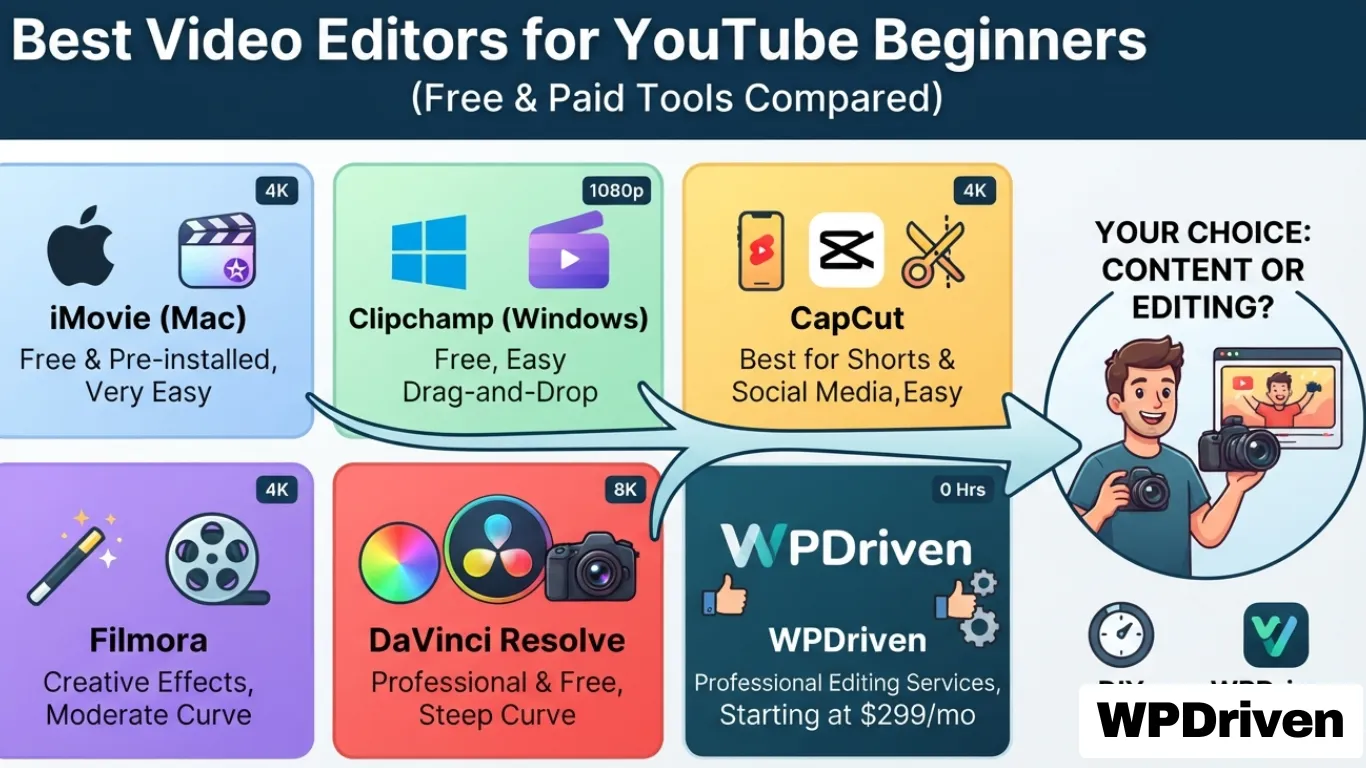
Quick Answer: The best video editors for YouTube beginners are iMovie (Mac), Clipchamp (Windows), CapCut (best for Shorts), Filmora (creative tools), and DaVinci Resolve (professional free). For creators who want to focus on content rather than editing, WPDriven offers professional video editing services starting at $299 per month.
Why Choosing the Right Video Editor Matters
You’re starting a YouTube channel. You have ideas, a camera, and the drive to create. But then you open a video editor — and suddenly, you’re overwhelmed with timelines, effects, and export settings.
The wrong editor can kill your momentum.
Too complex? You’ll give up before you start.
Too limited? Your videos will look amateur.
Too expensive? You’ll waste budget on features you don’t need.
This guide breaks down the best video editors for YouTube beginners — ranked by ease of use, features, and price — so you can start creating great content today.
Quick Comparison — Best Video Editors for YouTube Beginners
Editor
Best For
Price
Learning Curve
Export Quality
iMovie
Simple Mac editing
Free (Mac only)
Very Easy
Up to 4K
Clipchamp
Easy Windows editing
Free (Windows 11)
Very Easy
Up to 1080p (free)
CapCut
Shorts & social media
Free
Easy
Up to 4K
Filmora
Creative effects
Paid (free trial)
Moderate
Up to 4K
DaVinci Resolve
Professional free editing
Free
Steep
Up to 8K
WPDriven
Done-for-you editing
$299/month
None
Professional
Deep Dive — The Top 5 Video Editors for Beginners
1. iMovie (Mac) — Best Free Editor for Apple Users
Why Choose iMovie:
Free and pre-installed on all Mac devices
Simple drag-and-drop interface
Basic editing tools, effects, and transitions
Supports 4K video editing
Seamless integration with Apple devices
Who Should Use iMovie:
Beginner YouTubers looking for a free, easy-to-use editing tool
Mac users who want to edit quickly without complicated software
Vloggers and content creators needing basic but high-quality video edits
Limitations:
Mac only (no Windows or Linux version)
Limited advanced features (no color grading, no motion tracking)
No built-in stock media library
Best For: Starting your YouTube journey on a Mac.
2. Clipchamp (Windows & Web) — Best Free Editor for Windows Users
Beginner and intermediate YouTubers looking for a creative yet simple editing tool
Vloggers, content creators, and marketers who want high-quality edits with minimal effort
Users who want advanced effects and AI tools without the steep learning curve
Limitations:
Paid software (free trial with watermark)
Export quality limited in free version
Less powerful than DaVinci Resolve for advanced editing
Best For: Creators who need a balance of creativity, ease of use, and affordability.
5. DaVinci Resolve (Windows, Mac & Linux) — Best Free Editor for Advanced Editing
Why Choose DaVinci Resolve:
Free professional-grade editing software (used in film and TV)
Advanced color correction, visual effects, and audio tools
AI-powered editing features (smart reframing, auto color matching, noise reduction)
Comprehensive audio editing with Fairlight tools
Who Should Use DaVinci Resolve:
Beginners who want a free but powerful editor they can grow with
YouTubers, content creators, and filmmakers looking for pro-level tools
Creators who want advanced color correction and visual effects without paying
Limitations:
Steep learning curve (requires time and practice)
Requires a powerful computer to run smoothly
More complex than beginner-friendly tools
Best For: Serious creators who want to take their video editing skills to the next level.
Choosing the Right Editor for You
If You Want…
Choose…
A free, simple editor for Mac
iMovie
A free, simple editor for Windows
Clipchamp
Quick edits for Shorts & social media
CapCut
Creative effects with easy tools
Filmora
Professional-level editing for free
DaVinci Resolve
No editing at all — focus on content
WPDriven
The Hidden Cost of DIY Video Editing
While free editors save money upfront, they cost you time — and time is money.
Factor
DIY Editing
WPDriven (Done-for-You)
Time per video
2-10 hours
0 hours
Your hourly rate
$50-$200 (opportunity cost)
N/A
Learning curve
Days to months
None
Quality
Varies (learning required)
Professional every time
Cost per video
$100-$2,000 (your time)
Starting at $299/month
Consistency
Inconsistent
Consistent, professional brand
Real example: A YouTuber spending 5 hours per video editing at $100/hour = $500 of their time. With WPDriven’s $299/month editing service, they get 2-3 videos edited professionally per month — saving time and money while producing higher-quality content.
When to Upgrade to Professional Editing
Sign You Need Professional Editing
Why
You’re spending more time editing than creating
Focus on your content, not the timeline
Your videos don’t look consistent
Professional editors maintain brand consistency
You want better retention and engagement
Effects, transitions, and captions matter
You’re scaling your channel
You can’t edit 3 videos/week and grow
You want to monetize
Professional quality increases watch time and revenue
How WPDriven Can Help
WPDriven offers professional video editing services designed for creators who want to focus on content, not editing.
What We Offer:
Engaging video edits for YouTube, TikTok, and Instagram
Eye-catching transitions, captions, and effects
AI-powered enhancements for smooth and professional visuals
Fast turnaround times to keep your content consistent
Free sample edit to prove our quality
Pricing:
Starter: $299/month — 1-2 videos per month
Growth: $499/month — 3-5 videos per month
Pro: Custom pricing — 5+ videos per month
Which Video Editor Should You Choose?
If You Are…
Choose…
A beginner on Mac
iMovie
A beginner on Windows
Clipchamp
A Shorts/TikTok creator
CapCut
A creative beginner
Filmora
A future pro editor
DaVinci Resolve
A creator who wants to focus on content
WPDriven
Your Next Step
Option 1: Edit Yourself — Use the guide above to pick the right free editor and start creating.
Option 2: Get Professional Editing — Let WPDriven handle your video editing so you can focus on growing your channel.
AI-powered video editing is revolutionizing how creators, businesses, and influencers produce content. With artificial intelligence (AI), video editing is now faster, smarter, and more efficient—allowing anyone to create high-quality videos with minimal effort.
Whether you’re making YouTube videos, Instagram Reels, TikToks, or professional business videos, AI tools can automate tedious tasks, enhance creativity, and save hours of manual editing. But how does it work, and what are the best AI video editing tools available? Let’s explore.
How AI is Changing Video Editing
Traditional video editing is time-consuming—cutting, trimming, adding effects, and syncing audio can take hours or even days. AI-powered video editors, however, automate these processes using advanced machine learning and computer vision technologies.
Key Benefits of AI in Video Editing:
Faster editing with automatic cutting and transitions
Smart scene detection to highlight key moments
Automated subtitles and captions
Instant background removal without a green screen
Voice and music syncing for seamless audio integration
AI-generated effects and animations for professional-quality content
AI tools don’t replace human creativity, but they enhance it by eliminating repetitive tasks—allowing editors to focus on storytelling and creativity instead of technical work.
Best AI Video Editing Tools in 2024
1. Descript – AI-Powered Video & Podcast Editing
Best For: Video and audio editing, content creators, podcasters AI Features:
Text-based video editing
AI voice cloning for voiceovers
Automated subtitles and transcriptions
Descript – AI-Powered Video & Podcast Editing
Descript is an AI-powered video and audio editing tool that simplifies the editing process for creators, businesses, and podcasters. Unlike traditional timeline-based editors, Descript allows users to edit video and audio just like a text document—making it one of the easiest editing tools available.
Best For:
YouTubers who want quick, high-quality edits
Podcasters looking for an easy way to clean up audio
Businesses creating webinars, tutorials, or marketing content
AI Features:
Text-Based Video Editing – Edit videos by modifying the transcribed text. Delete a word, and that section of the video/audio is removed.
AI Voice Cloning – Generate realistic AI voiceovers from your own voice, allowing you to fix mistakes without re-recording.
Automated Subtitles & Transcriptions – Convert spoken words into accurate text, making videos more accessible.
Background Noise Removal – Clean up audio with AI-powered noise reduction.
Screen Recording & Overlays – Create tutorials and presentations with built-in recording tools.
Why Choose Descript?
Descript makes video and podcast editing faster, easier, and more accessible. Instead of spending hours manually cutting clips, users can edit content as quickly as they can type. For creators who need an efficient, AI-assisted editing tool, Descript is a game-changer.
2. Runway ML – AI-Generated Video Editing & Effects
Best For: AI-powered video effects, background removal AI Features:
AI background removal and replacement
Text-to-video AI editing
AI motion tracking and effects
Runway ML – AI-Generated Video Editing & Effects
Runway ML is an AI-powered video editing tool designed for creators, marketers, and social media professionals who want to add advanced effects, motion tracking, and background editing with minimal effort. Unlike traditional video software that requires manual keyframing and masking, Runway ML uses machine learning to automate these tasks, making professional-level effects accessible to everyone.
Best For:
Social media creators looking for quick, high-quality edits
Marketers and brands creating ads, promos, and engaging content
Video editors who want AI-powered tools to speed up their workflow
AI Features:
AI Background Removal & Replacement – Remove or replace backgrounds without a green screen.
Text-to-Video AI Editing – Generate videos from simple text prompts, making video creation effortless.
AI Motion Tracking & Effects – Automatically track objects in a video and apply effects seamlessly.
Color Grading & Super Slow-Motion – Enhance footage with cinematic colors and AI-generated slow-motion.
Why Choose Runway ML?
Runway ML is perfect for creators and businesses who want to add high-end effects without spending hours on manual editing. With its AI-driven tools, video editing becomes faster, smarter, and more creative, making it ideal for social media, marketing, and brand storytelling.
3. Pictory – AI Video Creator from Text
Best For: Automated video creation for blogs, marketing, and YouTube AI Features:
Converts blog posts or scripts into videos
AI-generated captions and voiceovers
Stock footage and images selected based on script
Pictory – AI Video Creator from Text
Pictory is an AI-powered video creation tool that turns blog posts, articles, and scripts into engaging videos in minutes. Designed for businesses, marketers, and content creators, Pictory automates the video production process, making it easy to create professional-looking videos without editing experience.
Best For:
Businesses repurposing blog content into video format
Marketers creating social media ads and promotional videos
YouTubers who want quick, high-quality videos without complex editing
AI Features:
Converts Blog Posts or Scripts into Videos – Paste a script or link, and Pictory automatically generates a video.
AI-Generated Captions & Voiceovers – Adds subtitles and AI voice narration for accessibility and engagement.
Stock Footage & Image Selection – AI chooses relevant visuals to match the script.
Video Summarization – Creates short, impactful videos from long-form content.
Why Choose Pictory?
Pictory is perfect for businesses and content creators who need fast, automated video production. With AI handling the editing, users can focus on content strategy while saving time and effort.
4. Magisto – AI-Powered Social Media Video Editing
Best For: Quick social media videos AI Features:
Automatic video editing with music and effects
AI-driven storytelling tools
Easy social media sharing
Magisto – AI-Powered Social Media Video Editing
Magisto is an AI-powered video editing tool designed to help businesses, influencers, and marketers create engaging social media content quickly. Using artificial intelligence, Magisto automates the video editing process by selecting the best footage, applying effects, and adding music—turning raw clips into professional-looking videos in minutes.
Best For:
Businesses creating ads, promotions, and brand videos
Influencers and content creators looking for fast, eye-catching social media videos
Marketers who need automated editing with minimal effort
AI Features:
Automatic Video Editing with Music & Effects – AI selects the best scenes, trims clips, and applies transitions, filters, and background music.
AI-Driven Storytelling Tools – Helps structure videos to make them more engaging and compelling.
Easy Social Media Sharing – Optimized for Instagram, Facebook, TikTok, and YouTube.
Facial Recognition & Emotion Detection – AI analyzes footage to highlight the most expressive moments.
Why Choose Magisto?
Magisto is perfect for businesses and influencers who want high-quality social media videos without spending hours editing. Its AI-powered automation makes video creation fast, simple, and effective, helping brands boost engagement with minimal effort.
AI Video Editing vs. Traditional Editing: Which is Better?
Feature
AI Video Editing
Traditional Video Editing
Speed
Fast automation
Time-consuming manual work
Ease of Use
Beginner-friendly
Requires editing skills
Customization
Limited AI-generated effects
Fully customizable
Creativity
AI assists, but human input is needed
Full creative control
Best For
Quick edits, social media content
High-end, professional projects
AI video editing is best for social media videos, YouTube content, and fast turnarounds. Traditional editing is best for high-budget films, cinematic projects, and detailed customization.
Is AI Video Editing Right for You?
If you create content regularly and need fast, high-quality videos, AI video editing is a game-changer. If you want full creative control, custom animations, or complex edits, traditional software like Adobe Premiere Pro or Final Cut Pro might still be the better choice.
The best approach is to use AI tools to speed up repetitive tasks and traditional editing for fine-tuning and creativity.
Final Thoughts: The Future of AI in Video Editing
AI is revolutionizing the video editing industry, making it easier, faster, and more accessible for everyone. Whether you’re a YouTuber, marketer, business owner, or content creator, AI-powered editing tools can help you produce high-quality videos in record time.
Want professional AI-assisted video editing? Let WPDriven handle it for you. We offer expert video editing and social media management to take your content to the next level.
Contact us today and let’s create amazing videos together.
Unleash WPDriven
Transform your workflow with cutting-edge AI automation.
Step into WPDRIVEN Join today and unlock limitless possibilities with our free demos.