Plank had an impressive line of high-end interior products — but their website didn’t reflect that. It was outdated, hard to navigate, and not optimized for mobile or modern buyer behavior. Key issues included:
An outdated design that didn’t match their premium brand
Scattered product information with unclear categorization
No search engine visibility or targeted content
A broken lead generation funnel, with the quote form buried and underperforming
Plank needed a digital presence as solid and well-built as their products.
The WPDriven Solution
We partnered with Plank to transform their digital brand experience from the ground up.
Designed a clean, modern UI with emphasis on structure, elegance, and usability
Rebuilt the website on WordPress with Elementor for flexibility and scalability
Created dedicated product pages for each core category: doors, windows, handles, hinges, and closers
Developed a smart quote form with filtering and conditional fields based on product type
Implemented a strategic SEO plan targeting high-intent product-specific keywords
Integrated analytics, conversion tracking, and schema to maximize visibility and lead attribution
Results After 3 Months
Metric
Before WPDriven
After WPDriven
Monthly Organic Traffic
~100
1,200+
Time on Site
38 seconds
2 minutes, 12 seconds
Keywords in Google Top 10
3
24
Monthly Quote Requests
1–2
40–60
Bounce Rate
84%
41%
Client Interview: “Planking With the Boss”
WPDriven: How did you feel about your old website before we started?
James (Founder of Plank): Honestly, embarrassed. It didn’t represent the quality of our products. It was like displaying fine hardware in a cardboard box.
WPDriven: What changed after the new site launched?
James: Our traffic went up, our quote forms started converting, and clients actually started mentioning how professional the website looked. That never happened before.
WPDriven: What was the best part of working with WPDriven?
James: The process was structured but easy. Your team handled everything from messaging to design to performance. I could focus on business while you handled the build.
WPDriven: Would you recommend WPDriven?
James: Absolutely. If your business sells anything premium and you want to look like it — WPDriven is who you call.
Conclusion
WPDriven helped Plank go from outdated and underperforming to polished and powerful. Their new website doesn’t just showcase products — it converts visitors into real business. For a company that builds doors, hinges, and handles, it was time their website opened the right ones.
Client: LawnShaper Landscaping Location: Dallas–Fort Worth, TX Website & SEO by: WPDriven Project Type: Full Website Redesign, Development & Local SEO Optimization
The Challenge
LawnShaper came to WPDriven with an old, patchy website—barely visible on Google, sluggish on phones, and about as stylish as a worn-out lawnmower.
They needed:
A modern, mobile-first design
Clear service info & quote forms
Local SEO that actually… worked
A brand that felt as fresh as their lawns
The WPDriven Solution
We didn’t just trim the edges—we reshaped everything from the soil up:
✅ Built on WordPress with Elementor ✅ Custom home and service pages (hello, SEO!) ✅ Quote form with geolocation and smart fields ✅ Lightning-fast, mobile-optimized performance ✅ SEO strategy that brought them to Google’s front yard
The Results
3 Months After Launch:
🚀 400% increase in local traffic
🧭 Ranked in Top 3 for 12+ local landscaping terms
📩 35–40 leads per month via the quote form
☎️ 300% rise in call inquiries from the website
📉 Bounce rate dropped by over 40%
Client Interview: “Digging In With Mike from LawnShaper”
WPDriven: So Mike, what did your website look like before WPDriven showed up?
Mike (Owner of LawnShaper): Honestly? Like a weed in the middle of a clean yard. Outdated, slow, and I think even my grandma couldn’t find the quote button.
WPDriven: What was the biggest difference after the new site launched?
Mike: Calls. Leads. Real customers. I thought SEO was a scam until y’all made the phone ring so much I had to buy a second one.
WPDriven: Did you have a favorite part of the process?
Mike: Watching my new homepage go live was like seeing a dirt patch turn into a golf course. Also, that “Get a Free Quote” button? I’m putting it on a t-shirt.
WPDriven: Would you recommend WPDriven to other businesses?
Mike: Only if I don’t like them. Just kidding—1000%. If you need a site that actually works, these are your people.
Summary
LawnShaper didn’t just get a website—they got a growth engine. Thanks to WPDriven, they now stand tall in their market, with a beautiful site, high Google rankings, and steady leads rolling in.
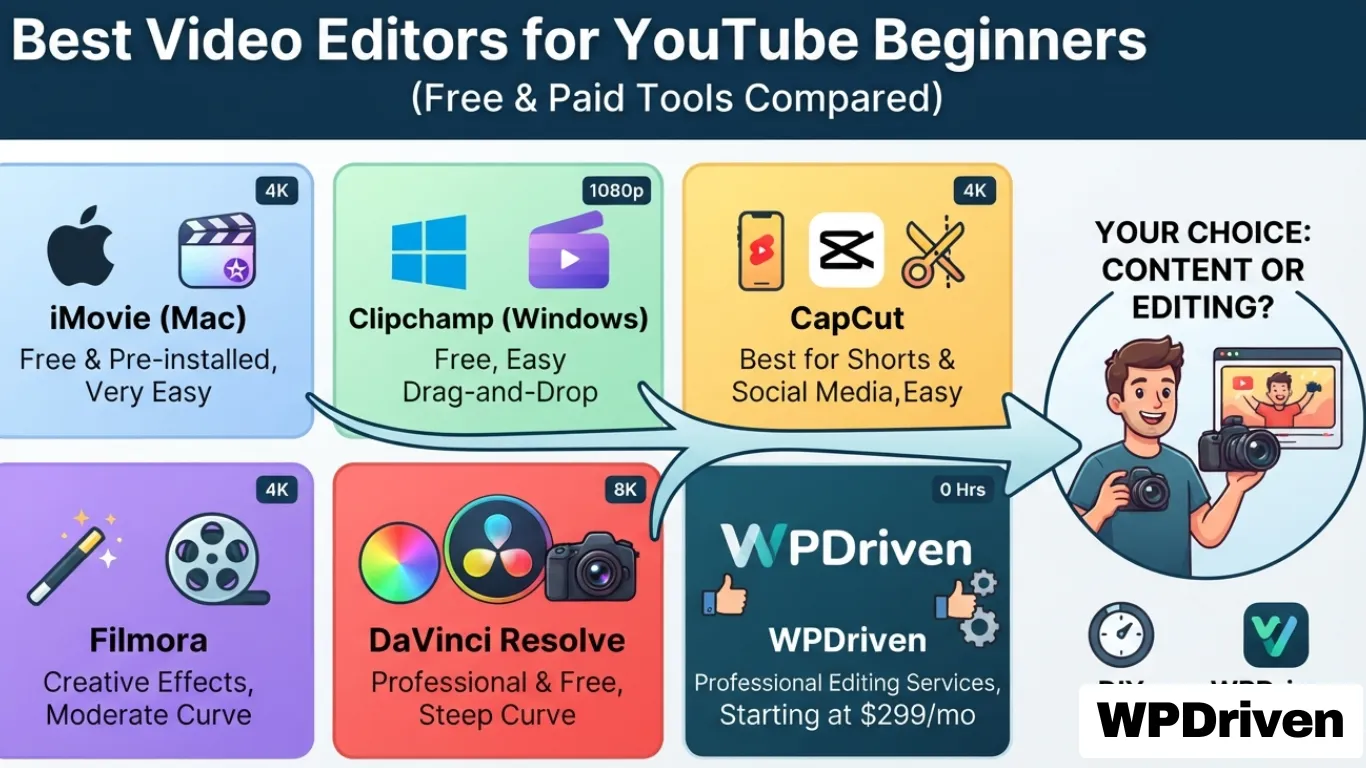
Quick Answer: The best video editors for YouTube beginners are iMovie (Mac), Clipchamp (Windows), CapCut (best for Shorts), Filmora (creative tools), and DaVinci Resolve (professional free). For creators who want to focus on content rather than editing, WPDriven offers professional video editing services starting at $299 per month.
Why Choosing the Right Video Editor Matters
You’re starting a YouTube channel. You have ideas, a camera, and the drive to create. But then you open a video editor — and suddenly, you’re overwhelmed with timelines, effects, and export settings.
The wrong editor can kill your momentum.
Too complex? You’ll give up before you start.
Too limited? Your videos will look amateur.
Too expensive? You’ll waste budget on features you don’t need.
This guide breaks down the best video editors for YouTube beginners — ranked by ease of use, features, and price — so you can start creating great content today.
Quick Comparison — Best Video Editors for YouTube Beginners
Editor
Best For
Price
Learning Curve
Export Quality
iMovie
Simple Mac editing
Free (Mac only)
Very Easy
Up to 4K
Clipchamp
Easy Windows editing
Free (Windows 11)
Very Easy
Up to 1080p (free)
CapCut
Shorts & social media
Free
Easy
Up to 4K
Filmora
Creative effects
Paid (free trial)
Moderate
Up to 4K
DaVinci Resolve
Professional free editing
Free
Steep
Up to 8K
WPDriven
Done-for-you editing
$299/month
None
Professional
Deep Dive — The Top 5 Video Editors for Beginners
1. iMovie (Mac) — Best Free Editor for Apple Users
Why Choose iMovie:
Free and pre-installed on all Mac devices
Simple drag-and-drop interface
Basic editing tools, effects, and transitions
Supports 4K video editing
Seamless integration with Apple devices
Who Should Use iMovie:
Beginner YouTubers looking for a free, easy-to-use editing tool
Mac users who want to edit quickly without complicated software
Vloggers and content creators needing basic but high-quality video edits
Limitations:
Mac only (no Windows or Linux version)
Limited advanced features (no color grading, no motion tracking)
No built-in stock media library
Best For: Starting your YouTube journey on a Mac.
2. Clipchamp (Windows & Web) — Best Free Editor for Windows Users
Beginner and intermediate YouTubers looking for a creative yet simple editing tool
Vloggers, content creators, and marketers who want high-quality edits with minimal effort
Users who want advanced effects and AI tools without the steep learning curve
Limitations:
Paid software (free trial with watermark)
Export quality limited in free version
Less powerful than DaVinci Resolve for advanced editing
Best For: Creators who need a balance of creativity, ease of use, and affordability.
5. DaVinci Resolve (Windows, Mac & Linux) — Best Free Editor for Advanced Editing
Why Choose DaVinci Resolve:
Free professional-grade editing software (used in film and TV)
Advanced color correction, visual effects, and audio tools
AI-powered editing features (smart reframing, auto color matching, noise reduction)
Comprehensive audio editing with Fairlight tools
Who Should Use DaVinci Resolve:
Beginners who want a free but powerful editor they can grow with
YouTubers, content creators, and filmmakers looking for pro-level tools
Creators who want advanced color correction and visual effects without paying
Limitations:
Steep learning curve (requires time and practice)
Requires a powerful computer to run smoothly
More complex than beginner-friendly tools
Best For: Serious creators who want to take their video editing skills to the next level.
Choosing the Right Editor for You
If You Want…
Choose…
A free, simple editor for Mac
iMovie
A free, simple editor for Windows
Clipchamp
Quick edits for Shorts & social media
CapCut
Creative effects with easy tools
Filmora
Professional-level editing for free
DaVinci Resolve
No editing at all — focus on content
WPDriven
The Hidden Cost of DIY Video Editing
While free editors save money upfront, they cost you time — and time is money.
Factor
DIY Editing
WPDriven (Done-for-You)
Time per video
2-10 hours
0 hours
Your hourly rate
$50-$200 (opportunity cost)
N/A
Learning curve
Days to months
None
Quality
Varies (learning required)
Professional every time
Cost per video
$100-$2,000 (your time)
Starting at $299/month
Consistency
Inconsistent
Consistent, professional brand
Real example: A YouTuber spending 5 hours per video editing at $100/hour = $500 of their time. With WPDriven’s $299/month editing service, they get 2-3 videos edited professionally per month — saving time and money while producing higher-quality content.
When to Upgrade to Professional Editing
Sign You Need Professional Editing
Why
You’re spending more time editing than creating
Focus on your content, not the timeline
Your videos don’t look consistent
Professional editors maintain brand consistency
You want better retention and engagement
Effects, transitions, and captions matter
You’re scaling your channel
You can’t edit 3 videos/week and grow
You want to monetize
Professional quality increases watch time and revenue
How WPDriven Can Help
WPDriven offers professional video editing services designed for creators who want to focus on content, not editing.
What We Offer:
Engaging video edits for YouTube, TikTok, and Instagram
Eye-catching transitions, captions, and effects
AI-powered enhancements for smooth and professional visuals
Fast turnaround times to keep your content consistent
Free sample edit to prove our quality
Pricing:
Starter: $299/month — 1-2 videos per month
Growth: $499/month — 3-5 videos per month
Pro: Custom pricing — 5+ videos per month
Which Video Editor Should You Choose?
If You Are…
Choose…
A beginner on Mac
iMovie
A beginner on Windows
Clipchamp
A Shorts/TikTok creator
CapCut
A creative beginner
Filmora
A future pro editor
DaVinci Resolve
A creator who wants to focus on content
WPDriven
Your Next Step
Option 1: Edit Yourself — Use the guide above to pick the right free editor and start creating.
Option 2: Get Professional Editing — Let WPDriven handle your video editing so you can focus on growing your channel.
AI-powered video editing is revolutionizing how creators, businesses, and influencers produce content. With artificial intelligence (AI), video editing is now faster, smarter, and more efficient—allowing anyone to create high-quality videos with minimal effort.
Whether you’re making YouTube videos, Instagram Reels, TikToks, or professional business videos, AI tools can automate tedious tasks, enhance creativity, and save hours of manual editing. But how does it work, and what are the best AI video editing tools available? Let’s explore.
How AI is Changing Video Editing
Traditional video editing is time-consuming—cutting, trimming, adding effects, and syncing audio can take hours or even days. AI-powered video editors, however, automate these processes using advanced machine learning and computer vision technologies.
Key Benefits of AI in Video Editing:
Faster editing with automatic cutting and transitions
Smart scene detection to highlight key moments
Automated subtitles and captions
Instant background removal without a green screen
Voice and music syncing for seamless audio integration
AI-generated effects and animations for professional-quality content
AI tools don’t replace human creativity, but they enhance it by eliminating repetitive tasks—allowing editors to focus on storytelling and creativity instead of technical work.
Best AI Video Editing Tools in 2024
1. Descript – AI-Powered Video & Podcast Editing
Best For: Video and audio editing, content creators, podcasters AI Features:
Text-based video editing
AI voice cloning for voiceovers
Automated subtitles and transcriptions
Descript – AI-Powered Video & Podcast Editing
Descript is an AI-powered video and audio editing tool that simplifies the editing process for creators, businesses, and podcasters. Unlike traditional timeline-based editors, Descript allows users to edit video and audio just like a text document—making it one of the easiest editing tools available.
Best For:
YouTubers who want quick, high-quality edits
Podcasters looking for an easy way to clean up audio
Businesses creating webinars, tutorials, or marketing content
AI Features:
Text-Based Video Editing – Edit videos by modifying the transcribed text. Delete a word, and that section of the video/audio is removed.
AI Voice Cloning – Generate realistic AI voiceovers from your own voice, allowing you to fix mistakes without re-recording.
Automated Subtitles & Transcriptions – Convert spoken words into accurate text, making videos more accessible.
Background Noise Removal – Clean up audio with AI-powered noise reduction.
Screen Recording & Overlays – Create tutorials and presentations with built-in recording tools.
Why Choose Descript?
Descript makes video and podcast editing faster, easier, and more accessible. Instead of spending hours manually cutting clips, users can edit content as quickly as they can type. For creators who need an efficient, AI-assisted editing tool, Descript is a game-changer.
2. Runway ML – AI-Generated Video Editing & Effects
Best For: AI-powered video effects, background removal AI Features:
AI background removal and replacement
Text-to-video AI editing
AI motion tracking and effects
Runway ML – AI-Generated Video Editing & Effects
Runway ML is an AI-powered video editing tool designed for creators, marketers, and social media professionals who want to add advanced effects, motion tracking, and background editing with minimal effort. Unlike traditional video software that requires manual keyframing and masking, Runway ML uses machine learning to automate these tasks, making professional-level effects accessible to everyone.
Best For:
Social media creators looking for quick, high-quality edits
Marketers and brands creating ads, promos, and engaging content
Video editors who want AI-powered tools to speed up their workflow
AI Features:
AI Background Removal & Replacement – Remove or replace backgrounds without a green screen.
Text-to-Video AI Editing – Generate videos from simple text prompts, making video creation effortless.
AI Motion Tracking & Effects – Automatically track objects in a video and apply effects seamlessly.
Color Grading & Super Slow-Motion – Enhance footage with cinematic colors and AI-generated slow-motion.
Why Choose Runway ML?
Runway ML is perfect for creators and businesses who want to add high-end effects without spending hours on manual editing. With its AI-driven tools, video editing becomes faster, smarter, and more creative, making it ideal for social media, marketing, and brand storytelling.
3. Pictory – AI Video Creator from Text
Best For: Automated video creation for blogs, marketing, and YouTube AI Features:
Converts blog posts or scripts into videos
AI-generated captions and voiceovers
Stock footage and images selected based on script
Pictory – AI Video Creator from Text
Pictory is an AI-powered video creation tool that turns blog posts, articles, and scripts into engaging videos in minutes. Designed for businesses, marketers, and content creators, Pictory automates the video production process, making it easy to create professional-looking videos without editing experience.
Best For:
Businesses repurposing blog content into video format
Marketers creating social media ads and promotional videos
YouTubers who want quick, high-quality videos without complex editing
AI Features:
Converts Blog Posts or Scripts into Videos – Paste a script or link, and Pictory automatically generates a video.
AI-Generated Captions & Voiceovers – Adds subtitles and AI voice narration for accessibility and engagement.
Stock Footage & Image Selection – AI chooses relevant visuals to match the script.
Video Summarization – Creates short, impactful videos from long-form content.
Why Choose Pictory?
Pictory is perfect for businesses and content creators who need fast, automated video production. With AI handling the editing, users can focus on content strategy while saving time and effort.
4. Magisto – AI-Powered Social Media Video Editing
Best For: Quick social media videos AI Features:
Automatic video editing with music and effects
AI-driven storytelling tools
Easy social media sharing
Magisto – AI-Powered Social Media Video Editing
Magisto is an AI-powered video editing tool designed to help businesses, influencers, and marketers create engaging social media content quickly. Using artificial intelligence, Magisto automates the video editing process by selecting the best footage, applying effects, and adding music—turning raw clips into professional-looking videos in minutes.
Best For:
Businesses creating ads, promotions, and brand videos
Influencers and content creators looking for fast, eye-catching social media videos
Marketers who need automated editing with minimal effort
AI Features:
Automatic Video Editing with Music & Effects – AI selects the best scenes, trims clips, and applies transitions, filters, and background music.
AI-Driven Storytelling Tools – Helps structure videos to make them more engaging and compelling.
Easy Social Media Sharing – Optimized for Instagram, Facebook, TikTok, and YouTube.
Facial Recognition & Emotion Detection – AI analyzes footage to highlight the most expressive moments.
Why Choose Magisto?
Magisto is perfect for businesses and influencers who want high-quality social media videos without spending hours editing. Its AI-powered automation makes video creation fast, simple, and effective, helping brands boost engagement with minimal effort.
AI Video Editing vs. Traditional Editing: Which is Better?
Feature
AI Video Editing
Traditional Video Editing
Speed
Fast automation
Time-consuming manual work
Ease of Use
Beginner-friendly
Requires editing skills
Customization
Limited AI-generated effects
Fully customizable
Creativity
AI assists, but human input is needed
Full creative control
Best For
Quick edits, social media content
High-end, professional projects
AI video editing is best for social media videos, YouTube content, and fast turnarounds. Traditional editing is best for high-budget films, cinematic projects, and detailed customization.
Is AI Video Editing Right for You?
If you create content regularly and need fast, high-quality videos, AI video editing is a game-changer. If you want full creative control, custom animations, or complex edits, traditional software like Adobe Premiere Pro or Final Cut Pro might still be the better choice.
The best approach is to use AI tools to speed up repetitive tasks and traditional editing for fine-tuning and creativity.
Final Thoughts: The Future of AI in Video Editing
AI is revolutionizing the video editing industry, making it easier, faster, and more accessible for everyone. Whether you’re a YouTuber, marketer, business owner, or content creator, AI-powered editing tools can help you produce high-quality videos in record time.
Want professional AI-assisted video editing? Let WPDriven handle it for you. We offer expert video editing and social media management to take your content to the next level.
Contact us today and let’s create amazing videos together.
When it comes to building a website, two key terms often come up: website design and website development. While they might seem similar, they serve different purposes. But which one is better? The answer depends on your goals, skills, and what you need for your website.
Let’s break it down and find out which is the right choice for you!
What is Website Design? 🎨
Website design is all about how a website looks and feels. A web designer focuses on visual appeal, user experience (UX), and layout to create a site that is attractive and easy to navigate.
Key Aspects of Website Design:
✅ Layout & Structure – Arranging content for a smooth experience. ✅ Color Schemes & Typography – Choosing the right colors and fonts to match a brand. ✅ Graphics & Images – Making the site visually engaging. ✅ User Experience (UX) & Navigation – Ensuring users can easily find what they need. ✅ Responsive Design – Making sure the website looks great on all devices.
Who Needs Website Design?
Businesses that want a modern, professional-looking website.
Brands focused on user engagement and aesthetics.
Anyone needing a custom, branded online presence.
👉 Website design makes your site look stunning and user-friendly.
What is Website Development? 💻
Website development is all about how a website functions. A web developer takes the design and turns it into a working website using coding languages like HTML, CSS, JavaScript, and PHP.
Key Aspects of Website Development:
✅ Front-End Development – The part users see and interact with. ✅ Back-End Development – The behind-the-scenes code that powers the website. ✅ Functionality & Features – Making sure forms, buttons, and other elements work properly. ✅ Database Management – Handling data storage and retrieval. ✅ Performance Optimization – Ensuring the site loads quickly and runs smoothly.
Who Needs Website Development?
Businesses that need custom features & advanced functionality.
E-commerce stores with checkout systems & databases.
👉 Website development makes your site functional and efficient.
Website Design vs. Website Development – Key Differences
Feature
Website Design 🎨
Website Development 💻
Focus
Visual appearance & user experience
Website functionality & performance
Tools Used
Figma, Adobe XD, Canva
HTML, CSS, JavaScript, PHP
Main Goal
Make the website look appealing
Make the website work smoothly
Skills Required
Graphic design, UI/UX, branding
Coding, programming, database management
Best For
Businesses focused on branding & engagement
Businesses needing advanced features & interactivity
Frequently Asked Questions (FAQs)
1. Which is better: web development or web design?
Neither is better—they are both important! If you want a website that looks great and attracts users, you need website design. If you want a website that is functional, fast, and interactive, you need website development. The best websites use both.
2. What is the difference between designing and developing a website?
Web design focuses on the visual aspects—how the website looks and feels.
Web development focuses on the technical aspects—how the website functions and runs.
3. Should I look for a web designer or developer?
If you want a visually appealing website with a great layout, branding, and user experience → Hire a web designer.
If you need a custom-built website with interactive features, databases, and secure coding → Hire a web developer.
If you want a fully functional, stunning website, you may need both!
4. What is more affordable: web design or web development?
Web design is usually more affordable since it focuses only on the visuals.
Web development is often more expensive because it requires coding, custom functionality, and advanced features.
Which One Should You Choose? 🤔
Which One is Right for You? 🤔
When building a website, both design and development play a crucial role. A great website needs stunning visuals and smooth functionality to truly stand out. The best solution? Work with a team that specializes in both—like WPDriven! 🚀
💡 Not sure yet? Want to see a preview before making a decision? We’ve got you covered!
👉 Let us create a FREE, fully responsive mockup for your business website—no commitment, no pressure. See your vision come to life before you decide!