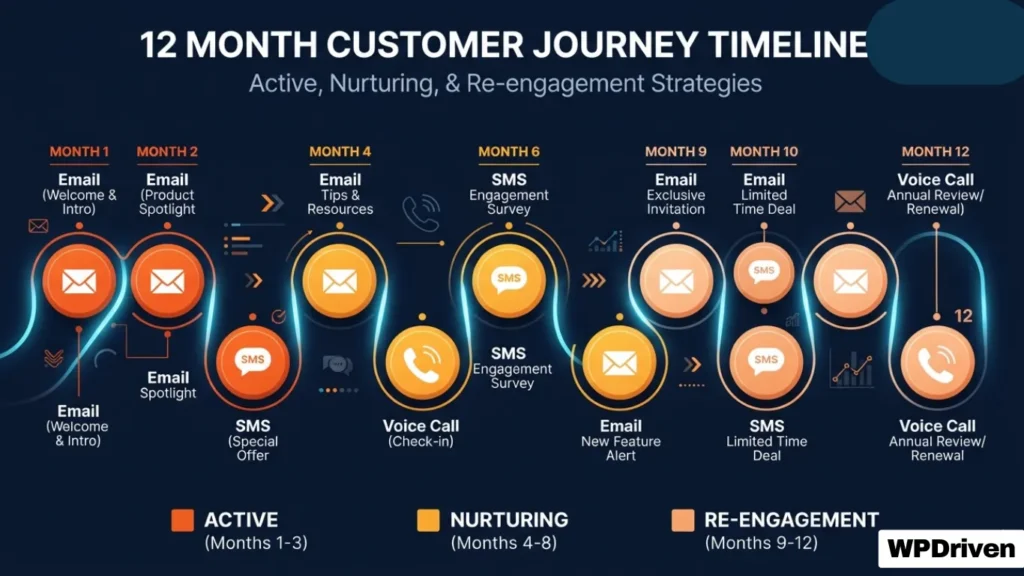
Quick Answer: A 12-touch automated follow-up system is a sequence of emails, texts, and voice calls that nurtures leads over 12 months. It’s designed to re-engage unresponsive leads without being annoying. 80% of leads need 5-7 touches before converting—most businesses give up after 1-2.
The Problem: You’re Giving Up Too Soon
You get a lead. You send one email. Maybe a text. No response. You move on.
You’re not alone. Most businesses follow up 1-2 times and then give up. But research shows that 80% of leads need 5-7 touches before they convert. The businesses that close the most deals are the ones that follow up consistently—without being annoying.
The result: You’re leaving money on the table. Leads that could have converted are sitting in your CRM, forgotten.
“I had 200+ leads sitting in my database with zero follow-up. WPDriven built a 12-touch nurture sequence. Within 60 days, three of those leads converted into paying clients.”
— Dr. Lisa Park, Dental Practice Owner, Chicago
The 12-Touch Framework: What It Is and Why It Works
A 12-touch follow-up system is a structured sequence of communications over 12 months. It’s designed to:
- Keep your business top-of-mind without being pushy
- Provide value at each touchpoint
- Re-engage leads who weren’t ready to buy initially
- Build trust over time
The Psychology: Most people aren’t ready to buy when they first inquire. They’re researching, comparing, or waiting for the right moment. A 12-touch system ensures you’re still there when they’re ready.
The 12-Month Sequence Breakdown
Months 1-3: Active Engagement (High Frequency)
| Touch | Channel | Message Type | Purpose |
|---|---|---|---|
| 1 | Welcome / Thank you | Acknowledge their inquiry, set expectations | |
| 2 | SMS | Quick follow-up | “Just checking in—did you have any questions?” |
| 3 | Educational content | Share a helpful resource (blog, video, guide) | |
| 4 | Voice | Voicemail drop | “Hi, just following up to see if you need help.” |
| 5 | SMS | Gentle reminder | “Still interested? I’d love to help.” |
| 6 | Social proof | Share a case study or testimonial |
Goal: Establish trust, provide value, and stay top-of-mind.
Months 4-6: Nurturing (Moderate Frequency)
| Touch | Channel | Message Type | Purpose |
|---|---|---|---|
| 7 | Industry insight | Share a relevant trend or update | |
| 8 | SMS | Check-in | “How’s everything going? Any questions?” |
| 9 | Special offer | Limited-time incentive (e.g., free consultation) |
Goal: Re-engage leads who are still on the fence.
Months 7-12: Reactivation (Low Frequency)
| Touch | Channel | Message Type | Purpose |
|---|---|---|---|
| 10 | Case study | Show real results from a similar client | |
| 11 | SMS | Final check-in | “Just one last follow-up. Still interested?” |
| 12 | Reactivation offer | “We’ve missed you. Here’s a special offer.” |
Goal: Recover leads who have gone cold.
Channel Strategy: Email vs. SMS vs. Voice
| Channel | Best For | Frequency | Response Rate |
|---|---|---|---|
| Educational content, social proof, offers | Weekly | 2-5% | |
| SMS | Quick check-ins, reminders, urgent offers | Bi-weekly | 20-35% |
| Voice (Voicemail) | Personal touch, relationship building | Monthly | 10-20% |
Pro Tip: A multi-channel approach triples your response rate compared to email alone. Some people respond to texts. Others prefer a personal voicemail. Use all three.
Message Templates for Each Touch
Touch 1: Welcome Email
Subject: Thanks for reaching out!
Body:
Hi [Name],
Thanks for your interest in [your service]. I wanted to personally welcome you and let you know I’m here to help.
In the meantime, here’s a resource that might be useful:
[Link to relevant blog post or guide]If you have any questions, just reply to this email. I’m happy to help.
Best,
[Your Name]
Touch 2: SMS Follow-Up
Hi [Name], it’s [Your Name] from [Your Business]. Just checking in—did you have any questions about [service]? Reply anytime.
Touch 5: SMS Reminder
Hi [Name], still interested in [service]? I’d love to help. Just reply YES and I’ll reach out. No pressure.
Touch 8: SMS Check-In
Hi [Name], hope you’re doing well. Just checking in—any updates on [their situation]? I’m here if you need anything.
Real Results: What This System Looks Like in Action
| Client | Industry | System | Results |
|---|---|---|---|
| Sarah Chen | Real Estate | Agent OS (12-touch nurture) | 247 untouched leads → 2 deals closed in first 90 days |
| Dr. Lisa Park | Dental Practice | 12-touch email/SMS | 200+ leads → 3 converted in 60 days |
| Marcus Webb | Home Services | GHL Rescue + Nurture | 12 broken automations fixed → lead response time from days to 60 seconds |
DIY vs. Done-for-You: Which Is Right for You?
| Factor | DIY | Agent OS (Done-for-You) |
|---|---|---|
| Time investment | 20-40 hours to build | 1-2 hours (providing content) |
| Technical skills required | High | None |
| Testing and debugging | 2-4 weeks | Included in setup |
| Ongoing management | Your responsibility | Optional monthly management |
| Unlimited revisions | No | Yes |
| Launch time | 4-12 weeks | 5-10 days |
Summary
| If You Want To… | You Need… |
|---|---|
| Follow up consistently for 12 months | A 12-touch automated sequence |
| Use multiple channels | Email + SMS + voice integration |
| Save time | Done-for-you automation |
| Recover dead leads | A nurture sequence that persists |
Your Next Step
Stop losing leads because you stopped following up. A 12-touch automated system ensures you’re always there when they’re ready.
Option 1: Get Agent OS (Complete System)
➡️ See Agent OS in Action →
Option 2: Start with the 12-Touch Nurture Sequence
📞 Book a Strategy Call →
Option 3: Download the 12-Touch Sequence Blueprint (Free PDF)
📥 Get the Template →